How to add additional ports to your Rust Server
Learn how to add additional ports to your rust server!
1 min readUpdated January 7, 2025NodeByte Team
rustportsrust+
QUERY Port
You are provided one free allocation per Rust server for your QUERY port.
To do this please follow the below
-
Open BytePanel
-
Load up your Rust Server
-
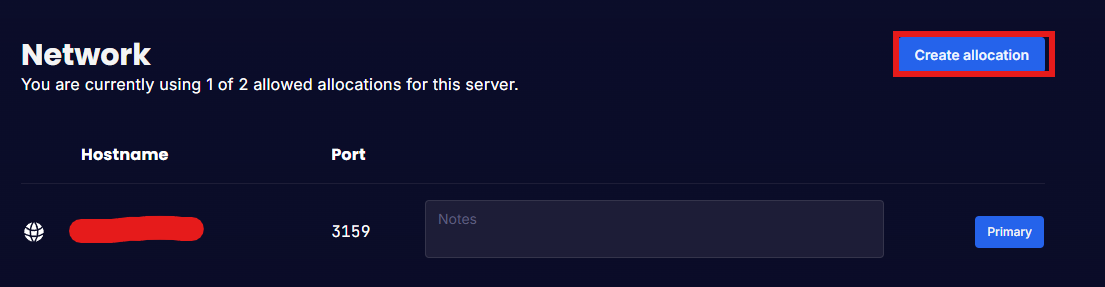
Go to the "Network" Tab
-
Click on "Create allocation"
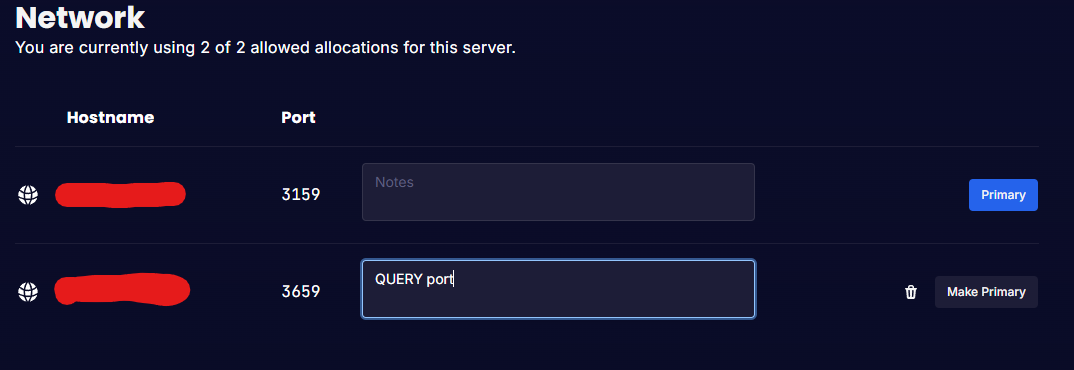
- Add a note so you know what this is being used for (optional)
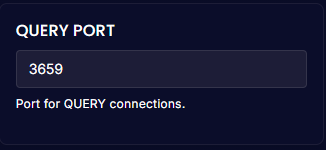
- Once you have created the Allocation go to the "Startup" tab and look for "QUERY PORT" then enter the PORT provided
- Start/Restart your server for the changes to take affect
Rust+ Port
If you would like to use Rust+ you must contact our Support Team to get one applied to your server.
Once you placed the ticket, the support team will take it from there and will have it ready for you to just start/restart your server. 😄